API reference
Plug-and-play REST. Smart defaults: you pass character_id + prompt, we handle the rest.
Quickstart
Three steps from zero to a generated image:
- Create an API key on your Profile page.
- Create a persistent character via
POST /v1/characterswith a trait combo, and we'll generate the base avatar. - Generate as many follow-up images as you want via
POST /v1/images:generateusing the returnedcharacter_id.
End-to-end cURL (replace $XAVIRA_API_KEY):
curl -X POST https://api.xavira.ai/v1/characters \
  -H "Authorization: Bearer $XAVIRA_API_KEY" \
  -H "Content-Type: application/json" \
  -d '{
    "model_id": "realistic-sharp-v1",
    "traits": {
      "gender": "female",
      "ethnicity": "east-asian",
      "ageRange": "23-29",
      "hairLength": "long",
      "hairColor": "black",
      "build": "slim",
      "breastSize": "medium"
    },
    "name": "Sora"
  }'

# → returns character_id

curl -X POST https://api.xavira.ai/v1/images:generate \
  -H "Authorization: Bearer $XAVIRA_API_KEY" \
  -H "Content-Type: application/json" \
  -d '{
    "character_id": "<from above>",
    "prompt": "sitting in a sunlit kitchen, casual sweater, candid"
  }'
Build with an AI assistant
Xavira is easy to start with from any LLM or coding agent: Claude Code, Cursor, OpenAI Codex, GitHub Copilot, Windsurf, ChatGPT, Gemini or your own. The full reference is also published as plain text, so the assistant can fetch everything it needs in one go:
https://xavira.ai/docs.md: the complete API reference as one Markdown file (endpoints, models, parameters, errors, webhooks).https://xavira.ai/openapi.yaml: the OpenAPI 3.1 spec, for typed clients and request validation.https://xavira.ai/llms.txt: a short index of all docs and guides, in the llms.txt format.
A prompt that works in any of them:
Read https://xavira.ai/docs.md and https://xavira.ai/openapi.yaml.
Then add Xavira to this project: create a character with POST /v1/characters,
generate an image with POST /v1/images:generate, and handle the async case
(202 + poll_url, or a webhook). Read the API key from the XAVIRA_API_KEY
environment variable.
Keep the key in an environment variable or your secret store and let the assistant reference it by name. Never paste an API key into a chat.
Authentication
Every request requires an API key in the Authorization header. Mint keys on your Profile page. Use a separate key per environment (production / staging / CI).
Authorization: Bearer xav_live_<your-key>
Keys are hashed at rest. The plaintext is shown once at creation time; lose it and you'll need to revoke + regenerate.
Models
Seven production models, one API: five for images, one for video, one for chat. Pick the model_id you want, and we handle the rest.
Speed versus the newest quality. realistic-v2 and semireal-v1 take longer per image than realistic-sharp-v1: an hd_portrait renders in about 9 seconds on realistic-sharp-v1 (two-week median, 1344×1728 after its always-on sharpening pass), in about 22 seconds on realistic-v2 (1120×1440, hires pass on by default since 2026-09-22) and about 12 on semireal-v1 (896×1152, hires opt-in), for a character that has an avatar. See what the defaults are for the options that change it. So the choice for a photoreal catalogue is a trade-off: realistic-sharp-v1 is the better choice for speed, realistic-v2 for sharpness and realism. Pick realistic-v2 when a crisp face, likeness, body settings and prompt adherence matter most; pick realistic-sharp-v1 when you generate at volume or your users wait on the result. realistic-v2 and anime-v2 cost 2 credits per image; every other image model, semireal-v1 included, costs 1.
Which model holds a likeness best. For matching a supplied reference photo, realistic-v2 is clearly the stronger choice: it carries the face of the reference or avatar across scenes, poses and framings more closely than realistic-sharp-v1, which keeps a character consistent across its own generations but follows a photograph less tightly. If identity is what you are buying, pick realistic-v2; if speed and volume matter more, pick realistic-sharp-v1. On any model a close-up keeps the face more recognisable than a wide shot, because in a wide shot the face covers a small part of the image. For a scene that needs a wide shot, also take a close-up of the same scene.
hd_portrait.
hd_portrait, delivered at 1120×1440 with the hires pass on by default so the face is as sharp as the hair on a close-up; hires_fix: "none" gives 896×1152 in about 15 s, see what the defaults are.
realistic-v2. For drawn-character catalogues that should not look like photos. About 12 s per hd_portrait, a little quicker than realistic-v2, with the same opt-in hires_fix.
anime-pure-v1, and on a reference image it also reads the drawing's look: hair colour including pink, purple, blue or silver, the fringe and hairstyle, eye colour, and accessories such as glasses or earrings. That goes into the character's appearance, so it carries into every scene. You can read and edit it like any other appearance. About 4 s per image.
anime-v2.
duration param. Async, webhook + poll.
character_id and the character that talks is the one your images show. Moderation included on every message and reply, with verdicts returned; chat settings for spice, style, initiative and length. See POST /v1/chat/completions.
Endpoints
All endpoints accept JSON, all return JSON. Base URL: https://api.xavira.ai.
POST /v1/characters
Create a persistent character by passing a closed-enum trait combo. We generate the base avatar and remember the identity for every subsequent generation against this character.
Body
One of realistic-sharp-v1, realistic-v2, semireal-v1, anime-v2, anime-pure-v1. See Models.
Closed-enum traits: see the trait enum table below. Closed enums prevent prompt-injection via trait input and give predictable output across customers using the same combo.
English only (see prompt tips). Free-text setting/outfit/pose description appended to the generated prompt. This styles the base avatar only, once: lighting, mood, clothing details, accessories, makeup, pose, setting. For detail that has to come back on every generation, use appearance instead. See scene vocabulary below for what works. Run through moderation Tier 1 (rules) + Tier 2 (AI text classifier).
English only. Free-text detail that belongs to the person rather than to one picture, written into the prompt of every generation for this character, right after the trait anchor, so you do not have to repeat it on every call and cannot forget it on one. Examples: "a black rose tattoo on the left shoulder", "a small crescent scar above the right eyebrow", "freckles across the nose".
How well it holds. Measured over 90 generations of one character across ten poses, asking for "a black rose tattoo on the left shoulder": the described artwork comes back in 9 of 10 generations, and lands on the named body part in about 4 of 10. The misses are near misses, an arm or the collarbone rather than nothing at all. So the design is dependable and the exact placement is not, which is worth knowing before you promise an end user a tattoo in a fixed spot.
We emphasise the anchor for you, which is the difference between this working and doing nothing at all: unweighted, the same description landed on the shoulder 0 times in 10. If you supply your own emphasis ("(black rose tattoo:1.2)") we leave your value alone. Resist going much above our default: at 1.6 the motif starts duplicating across arms, hips and ankles, so one rose becomes a woman covered in roses.
Use traits.tattoos for whether there is ink at all, and appearance for saying what it is. Keep it short and physical: it is prepended to every prompt, so a long one crowds out the scene you asked for. On anime-pure-v1, which is tag-driven, comma-separated fragments ("shoulder tattoo, black rose") land better than a full sentence. Naming ink here also switches on the same negative guard traits.tattoos uses, so "sleeve" is not rendered as a long-sleeved top. Set it later or clear it with PATCH /v1/characters/{id}. Run through moderation Tier 1 + Tier 2. Not applied when you generate with raw_prompt: true, which bypasses prompt building entirely, and not applied to the base avatar — pass the same words in scene as well if you want them on the avatar too.
Generate a clothed, safe-for-work base avatar. The realistic avatar is a headshot and already tame, but anime trait combos (voluptuous / large bust) can drift revealing, so sfw: true prepends a model-aware clothing cue and appends a hard nudity-blocker negative to the avatar prompt. Works for both realistic-sharp-v1 and anime-pure-v1. This only affects the one-time avatar. For a clothed result per generation, describe the clothing and setting in the prompt and add blockers via negative_prompt_append (see the safe-for-work guide); the sfw flag on /v1/images:generate was removed and is ignored. For best results name a closed casual garment plus bottoms in scene (e.g. "wearing a crew-neck sweater and jeans"). Avoid "blazer", "blouse" or "business/office" wording, which the realistic model tends to render as an open jacket over a bare chest.
Customer-facing label shown in your dashboard.
Arbitrary JSON for your own bookkeeping (internal ID, tag, etc).
Pass false to create the character asynchronously: we answer 202 in under a second with a character_id and a generation_id, and render the avatar in the background. See async creation below.
Only with wait: false. We POST the finished (or failed) generation here so you don't have to poll.
Avatars are always max quality. Character creation always renders athd_portrait(896 × 1152) withhires_fix: "1.5x"on. The base avatar is a one-time investment that conditions every subsequent generation for this character, with no reason to expose a "downgrade" knob. Per-genresolutionandhires_fixare still customer-settable on/v1/images:generate.
Reference images are a separate, gated route.POST /v1/charactersbuilds characters from trait combos only; areference_image_urlhere is refused. Bringing your own synthetic characters goes through reference images: open after a first credit pack, under a signed supply agreement, with every image screened and reviewed. Photographs and anything depicting a real person are never accepted, on any route.
Trait enum table
female · maleDetermines pronouns and gendered descriptors in the prompt.white · black · hispanic · middle-eastern · indian · east-asian · south-east-asianMaps to natural-language descriptors (realistic) or skin-tone tags (anime).18-22 · 21-22 · 23-29 · 30-39 · 40-plusAdult-only ranges by design. All values map to clearly-adult descriptors; under-18 is hard-blocked by moderation. 21-22 exists for platforms whose own terms set a floor above 18: without it the only compliant option was 23-29, which loses the youngest adult look entirely.short · medium · long—black · brown · blonde · red · auburn · grey · white—petite · slim · athletic · curvy · voluptuousAdult body types only. Petite means "small adult", never "child-like".small · medium · large · very-large · hugeOnly applies when gender=female. Ignored for male. large is the middle of the scale, not the top.small · medium · large · very-large · hugeOptional, independent of build. Only applies when gender=female. large is the middle of the scale.blue · green · brown · hazel · gray · amber · violet · dark-brownOptional. Anchored on every generation for the character, so you do not have to repeat it in each prompt.none · small · sleeves · heavyOptional. A coverage scale, not a design: it decides how much ink there is, across every generation, and it does not choose what the ink depicts. For that, describe the piece in appearance, which reproduces a named design reliably and its exact placement only about four times in ten. Defaults to no ink at all when unset, which is why a tattooed reference image can come back with clean skin.Response (201)
{
  "character_id":  "151fccbd-4667-43fc-9cc0-fe2be6b7d1b8",
  "generation_id": "9e1a7870-89b0-47cd-bc9a-60bdf42ecbf2",
  "avatar_url":    "https://pub-202d3c54....r2.dev/.../avatar.png"
}
Store the character_id: it's the only field you need to pass back on subsequent generations. Identity is preserved automatically from there. The generation_id is the avatar render itself, already completed, so there is nothing to poll. GET /v1/generations/{id} takes generation ids only: a character_id there answers 404 generation_not_found.
Async creation (wait: false)
By default this endpoint holds the connection open until the avatar exists. That is usually 8 to 16 seconds, and it is capped at 26 by our gateway. Two things break on that: a proxy or load balancer in front of your app with a shorter idle timeout will cut the request while we are still rendering (you see a 504 that never came from us), and a cold GPU worker takes longer than 26 seconds no matter what. Pass wait: false and neither can happen.
curl -X POST https://api.xavira.ai/v1/characters \
  -H "Authorization: Bearer $XAVIRA_API_KEY" \
  -H "Content-Type: application/json" \
  -H "Idempotency-Key: your-own-character-row-id" \
  -d '{"model_id":"realistic-sharp-v1","wait":false,"traits":{"gender":"female","ethnicity":"hispanic","ageRange":"23-29","hairLength":"long","hairColor":"blonde","build":"curvy"}}'
Response (202)
{
  "character_id":  "151fccbd-4667-43fc-9cc0-fe2be6b7d1b8",
  "generation_id": "9e1a7870-89b0-47cd-bc9a-60bdf42ecbf2",
  "status":        "pending",
  "avatar_url":    null,
  "cost_credits":  1,
  "poll_url":      "/v1/generations/9e1a7870-89b0-47cd-bc9a-60bdf42ecbf2"
}
The character_id is final from this moment: store it against your own record straight away. Then poll GET /v1/generations/{generation_id} (or wait for your callback_url) until status is completed, at which point output_url holds the avatar. Every second is plenty as a poll interval.
The character is not usable until the avatar lands./v1/images:generateand/v1/videos:generateanswer409 character_pendingwhile it is still rendering, because the avatar is the face every later generation is conditioned on.
A failed render costs nothing. The credit is taken when you call, and returned in full if the avatar never arrives, whether it failed outright or simply never reported back. You will see the generation instatus: "failed"with the reason inerror_message, and the character retired. Retrying with the sameIdempotency-Keyis allowed after a failure: a refunded attempt releases its key.
PATCH /v1/characters/{character_id}
Change how a character is described without creating a new one. The avatar and the face are untouched: this changes the words that go into every prompt, not who is in the picture, so the character_id and everything pointing at it keeps working.
Body
One or more closed-enum traits. See the trait enum table. Merged onto the character's existing combo, so {"traits":{"gender":"male"}} changes only that field and leaves the rest alone. Each value you send is checked against its own enum and the error names the key that is wrong; keys you do not send are left as they are, including when the character has none stored yet. An unknown key is rejected rather than silently stored.
Set or replace the free-text appearance anchor. Pass null to clear it. Run through moderation Tier 1 + Tier 2, so this can answer 422.
Rename the character.
semireal-v1 characters built from a reference image only. When the reference shows a handheld prop or something in the mouth (a cigarette, a phone, a weapon, a folder), we remove it from the copy the renders work from, a few minutes after the character is created, so it does not carry into every scene. Your reference and the avatar stay exactly as supplied. Pass true to render from the reference as it is, props included; false turns the removal back on. To get a prop in one scene, name it in the prompt.
Move a photo character between realistic-sharp-v1 and realistic-v2. Both render from the character's existing avatar, so the face stays the same and nothing is regenerated; the next images:generate call uses the new model and is billed at that model's price (realistic-v2 is 2 credits). Other models keep the model they were created with: create a new character for semireal-v1 or anime, otherwise the request is rejected with model_switch_not_supported.
Pass at least one of these fields, or the request is rejected with nothing_to_update.
Characters built from a reference image often carry a partial trait combo. The intake classifier stores only what it could actually read off the picture, so traits may be missing fields or be empty entirely. That is fine to generate with, and you can fill it in one field at a time whenever you like.
The avatar is not re-rendered. On a character you created from a trait combo, the avatar was generated from the old traits, so changing them lets the two drift apart. That is allowed and sometimes what you want; if you need the avatar to match, create a new character instead.
curl -X PATCH https://api.xavira.ai/v1/characters/151fccbd-4667-43fc-9cc0-fe2be6b7d1b8 \
  -H "Authorization: Bearer $XAVIRA_API_KEY" \
  -H "Content-Type: application/json" \
  -d '{"traits":{"hairColor":"blonde"},"appearance":"a black rose tattoo on the left shoulder"}'
Response (200)
{
  "character_id": "151fccbd-4667-43fc-9cc0-fe2be6b7d1b8",
  "name":         "Ava",
  "model_id":     "realistic-sharp-v1",
  "avatar_url":   "https://pub-202d3c54....r2.dev/.../avatar.png",
  "traits":       { "gender": "female", "...": "..." },
  "appearance":   "a black rose tattoo on the left shoulder",
  "created_at":   "2026-08-20T21:48:34.281Z"
}
A character_id that is not on your account returns 404 character_not_found.
GET /v1/characters
List the characters on your account, newest first. This is how you recover a character_id you did not store: it is only returned once, in the response to POST /v1/characters, and creating the character again would give you a different face.
Query
How many characters to return.
The next_cursor of the previous page. Omit it for the first page.
curl "https://api.xavira.ai/v1/characters?limit=50" \
  -H "Authorization: Bearer $XAVIRA_API_KEY"
Response (200)
{
  "object": "list",
  "data": [
    {
      "character_id": "151fccbd-4667-43fc-9cc0-fe2be6b7d1b8",
      "name":         "Ava",
      "model_id":     "realistic-v2",
      "avatar_url":   "https://pub-202d3c54....r2.dev/.../avatar.png",
      "traits":       { "gender": "female", "...": "..." },
      "appearance":   null,
      "created_at":   "2026-09-23T20:14:13.507Z"
    }
  ],
  "has_more": false,
  "next_cursor": null
}
When has_more is true, pass next_cursor as cursor to get the next page. A character created with wait: false is listed once its avatar has landed. The same list is on your profile page, with a copy button per ID.
POST /v1/images:generate
Generate a new image against an existing character. Sync-first, async fallback: most gens complete inline (HTTP 201, full output_url in the response). When a gen takes longer than our sync budget (~23s) we return HTTP 202 with a poll URL, and you call GET /v1/generations/:id until the status flips to completed.
Body
Returned from POST /v1/characters. The model + face are inherited from the character.
English works best (see prompt tips). A prompt in a non-Latin script (Russian, Chinese, Japanese, Korean, Arabic, Persian) is translated to English before generating, and the English we used comes back as translated_prompt. Free-text. Describe the scene / pose / outfit / lighting; we already encode the character identity.
Pick from a curated set of size + orientation presets. Default hd_portrait (896×1152) for maximum detail; pass sd_portrait for a faster, lighter render. Every preset costs the same single credit. See resolution presets below for all six options.
Sharpening pass after the base render. On realistic-sharp-v1 and the anime model: "1.5x" (default) = max detail, "1.25x" = faster, smaller output, slightly less micro-detail; both produce integer pixel counts on every resolution preset, see the presets table. On realistic-v2 the default is "1.25x" (1120×1440, it keeps the face as sharp as the hair); "none" turns it off. On semireal-v1 there is no pass unless you ask for one, because the base render is already sharp there. What the defaults are shows what it adds.
Name the pose template yourself instead of letting us infer it from your prompt. Pass any key from known pose aliases (e.g. "doggy", "pov-oral"), or "none" to apply no pose template at all while keeping the quality prefix and your character's traits.
By default we infer the pose from your text, and inference is the main reason a result can differ from what you pictured: the matcher has to pick the closest key it knows, so a request that isn't really any of them still lands on one. pose removes the guesswork. Use "none" when you want to describe the composition entirely yourself — camera angle, body position, framing — and keep identity consistency, which raw_prompt cannot do because it drops the traits string too. Cannot be combined with raw_prompt (400 conflicting_params); an unknown key returns 400 invalid_pose with the full list, and a key the character's model has no template for, for the character's gender, returns 400 pose_not_supported with the keys it does offer, unbilled (see Poses per model).
By default we enhance your prompt server-side: we prepend a quality prefix + the character's traits string, and we match common pose aliases (e.g. "blowjob pov" expands to the full POV-oral prompt with weighted camera angles and anatomy anchors). Set raw_prompt: true to ship your prompt verbatim, useful if you already include your own quality cues or pose detail and want full control over what reaches the model.
Removed from this endpoint: it did not reliably produce clothed images. Still accepted so existing integrations keep working, but it has no effect and the response includes a warnings entry. See Generating SFW (clothed) images for the approach that replaces it. (sfw on /v1/characters is unaffected.)
Keep the matched pose but remove the nudity. Where sfw drops the pose entirely, clothed_pose: true applies the pose composition (from behind, straddling, on all fours, looking back, …) with the character dressed, then adds a clothing cue + nudity-blocker negative. Use it for a persona in an NSFW pose while staying dressed. Explicit acts, including oral, keep the act and the composition; positional and suggestive poses keep theirs. Enforced on the output: every clothed_pose image is checked for nudity before it is returned (bare breast or nipple, genitals, the anus, pubic area, bare buttocks, also through see-through fabric). An image that shows any is withheld with 422 output_blocked and not charged; if the check cannot run, the image is withheld with a retryable 503 moderation_unavailable, never returned unchecked. This holds whatever the prompt says, including raw_prompt. It is about nudity only: an act pose keeps the act, clothed, so for an all-ages surface send no act poses or sexual wording. Measured on 123 past renders across all image models, checked by eye: every image showing nudity was caught, and about 1 in 20 clean images was withheld anyway (wet swimwear, a thin white top) (2026-10-19).
Ask for a post-generation read on whether the character came out dressed. The response then carries clothed (boolean) and clothed_confidence (0-100, where low means worth a look). Realistic model only, and off by default, since most traffic here is intentionally explicit and should not pay for the extra step. On a 120-image hand-labelled set it flagged every result with a bare breast visible, and sent back about 4% of clean images that did not need it, so a low score is worth acting on and a high one is worth trusting. Nothing is retried for you. If the score is low and you want another try, call this endpoint again; each call is billed. Retrying once on a low score took a 1-in-5 exposure rate to roughly 1 in 25 in our tests. Adds roughly a second to the call.
Appended to our house negatives (we already block deformed hands, watermarks, etc). Use only for additional aesthetic exclusions. Not used on realistic-v2 and semireal-v1, which take no negative prompt; the response then carries a negative_prompt_not_used warning. To keep those two dressed, name the garments in prompt or send clothed_pose: true.
Cover exposed genitals in the returned image: "mosaic" (pixelated) or "blur"; true means mosaic. Off by default, and billed the same. It runs after our output checks: a vision model finds the regions, they are padded and covered, and only the censored file is returned (the original is deleted). The response carries censored: true, censor_mode and censor_regions (how many regions we covered; 0 means the detector found nothing exposed and the image is returned unchanged, which includes a render whose genitals are out of frame, covered, or already obscured in the drawing itself, so 0 does not mean the image is unsafe). It is best effort, not a guarantee: a region the detector misses stays visible. If the detector cannot answer you do not get an uncensored image instead: 503 censor_unavailable on a synchronous call (nothing charged, safe to retry), and an async gen fails and is refunded. Adds about 1 to 3 seconds. Any other value is a 400 invalid_censor.
Deprecated on 2026-09-20 and not worth sending. It re-draws the detected face on its own on realistic-v2 and pastes it back. It existed because the base render used to leave a small face soft; it no longer does, so the setting we would pick is now simply the default. Off unless you pass true, which costs about 2 seconds and can put scene content in the head on full-body shots, because it paints inside a face-shaped box while your prompt describes the whole scene. Still accepted so existing integrations keep working, and the response echoes face_detail: true when it ran. semireal-v1 and the anime model do not accept it at all: 400 invalid_face_detail.
For reproducibility. Same seed + same prompt + same character + same pose = same output, within model determinism. When you name no place in the prompt, the seed also picks one of a few default settings, so two seeds can differ in setting as well as in noise; name the place if you want it fixed. On drawn references some seeds render a washed-out or sketch-like frame for a given reference and pose. If one does, pick another seed rather than retrying it: the same seed returns the same frame.
Pin pose (or raw_prompt) if reproducibility matters to you. Without it the pose is inferred per call, and inference is not part of the seed: two calls with identical inputs can resolve to different templates and therefore produce genuinely different images. With the pose pinned, the only remaining variation is the model's own.
A key that is not in this table is ignored today and answered with an unknown_field entry in warnings that names the keys. From 2026-10-01 the same request is refused with 400 unknown_field. When one of the keys belongs to the character (gender, traits, ethnicity, build, …) the message says so: identity is set once in traits on POST /v1/characters and inherited by every image; putting gender: "male" on this call cannot change what the character is.
Framing
Optional framing decides how much of the body is in shot. Two values: "full_body" on every image model, and "close_up" on realistic-v2 and semireal-v1 only. Leave it out and nothing changes.
"full_body" on free text puts a camera-distance sentence first in the prompt, the way a library pose states its own framing. Before 2026-10-13 a free-text scene ignored it: a situation in the text ("wrists tied above his head") stopped the picture at the chest, with or without the value. With it, in our test of that scene and a seated one, the body down to the legs was in frame in 46 of 48 renders over realistic-v2 and semireal-v1. The two misses were one character built from a tight face crop: a drawn reference that is only a face can still pull the camera in, so a reference that shows more of the body helps.
fingering on semireal-v1. On a character made from a drawing (drawn_reference), fingering, and masturbating on a woman, which renders it, return 400 pose_not_supported: on drawn references it drew a man's penis entering her instead of her own fingers, and none of six compositions we tried passed without that. On photo characters it renders from a camera above the bed since 2026-10-14: in our test 0 of 9 renders drew a penis (before: 4 of 9), and 7 of 9 showed her hand on her vulva.
Props and furniture in free text. A blindfold, wrists tied above the head and bending over a desk are now written into the prompt as objects of their own, and a shower, desk or chair in the text sets the room when the prompt names no other place. Measured on two drawn semireal-v1 characters over three seeds (2026-10-14), against the previous version: blindfold 0 to 5 of 6, rope above the head about 3 to 5 of 6, bent over a desk 0 to 4 of 5, and a shower scene set in a shower 0 to 12 of 12 (it was a bedroom). "Shy" or "embarrassed" in the text now shows on the face (a blush and a look away) in 6 of 6 renders on the same drawn characters, against 0 to 1 of 6 before. Other props and furniture are not reliable yet: a back against a wall and sitting backwards on a chair came out right in at most 1 of 6. Free text that contains a pose word such as "kneeling", "standing" or "bent over" is matched to that library pose unless you send pose: "none", and a library pose does not carry the objects in your text. When the props in a scene matter, send "none" and check matched_pose in the response.
Restraints and leg positions in free text (2026-10-15). Measured the same way on two drawn semireal-v1 characters over three seeds: wrists and ankles tied with rope, the rope is now drawn on the wrists in 6 of 6 (0 before) and on the ankles in 6 of 6 when she is lying down (shown on her side with the knees bent; 3 of 6 kneeling); arms tied behind the back 6 of 6 (0 before), shown from a three-quarter view from behind so the tied wrists are in frame; kneeling with the hands behind the back 5 of 6 (about 3 before), shown from the side; legs apart 6 of 6 (about 1 before). Lying, kneeling or sitting on the floor is set on a floor rather than a bed when the prompt names no other place, and a drawn full_body render frames head to feet when the ankles are tied.
"close_up" gives a head-and-shoulders portrait with the face filling the frame, at full output resolution, so there is nothing to crop afterwards. It applies to free-text prompts; a library pose keeps its own framing. The two newer models crop wide on their own and ignore framing words inside the prompt (five requests asking for a headshot in the text came back as body shots), but a framing sentence placed first, where a pose template states its framing, gave three head-and-shoulders portraits out of three. That is what this value sends. Passing it to realistic-sharp-v1 or the anime model is a 400 invalid_framing, for the reason below.
It exists because framing words stop working once a prompt gets long. On one scene over ten seeds, a full-length instruction in front of a short prompt gave head to toe 36 times out of 36; the same instruction in front of a 150-word paragraph gave 2 out of 10. framing spreads the instruction through the whole prompt instead of leaving it at the front, which takes that same paragraph to 7 out of 10. A short prompt is unaffected, it was already working.
Two things it does not do. It will not fix a prompt that argues with itself (asking for a close-up selfie and framing: "full_body"), and it is not a guarantee, so if head to toe is essential, keep the prompt short as well. The value is echoed back in the response, and an unknown one is a 400 invalid_framing rather than silence.
On realistic-sharp-v1 there is deliberately no "close_up", "portrait" or "half". We built and measured them: each came back as a knee-length shot, near-indistinguishable from the other and from passing nothing. Repeating an instruction can push a frame wider, which is what the model does not do on its own, but it cannot pull one tighter, because the model already crops close. Rather than ship two values that quietly do nothing, we ship the one that works. For a tighter shot, say so in the prompt and keep the prompt short.
{ "character_id": "chr_...", "prompt": "walking down a city street at sunset, fitted black dress", "framing": "full_body" }Resolution presets
Realistic gens run a hires-fix sharpening pass on top of the base render (default scale 1.5x; pass hires_fix: "1.25x" for the lighter / faster variant). Anime renders in a single pass at the base resolution, so hires_fix does not apply and the FINAL @ columns below are realistic-only.
Every preset costs the same regardless of hires-fix level: 1 credit, or 2 on realistic-v2. Custom width / height are not accepted: we curate the set so every output lands on quality-tested dimensions (integer pixel counts at every scale factor).
What the defaults are
You do not tune this API. We pick the sampler, the steps, the strengths and the passes per model, test them, and ship the result as the default, so that a working request is a character_id and a prompt and nothing else. That is deliberate: a catalogue built on our defaults keeps looking the same when we improve a model, while a catalogue built on hand-picked settings turns into a regression you did not ask for.
So the list below is short, and it is the whole list. An image sent with no options at all renders on realistic-v2 at 1120×1440 with the hires pass on (since 2026-09-22), which is what keeps the face as sharp as the hair on a close-up, in about 22 seconds; on semireal-v1 at 896×1152 in about 12 seconds; for a character with an avatar. That is the render most catalogues ship, and none of the options below changes what an image costs.
realistic-v2 render, when speed matters more than the face on a close-up
hires_fix: "none"
896×1152 without the hires pass, about 15 s instead of 22. The face is softer on a tight close-up (hair and shoulders stay sharp); in full-body shots the difference is small.
semireal-v1 image, for print, zoom or a tight crop
hires_fix: "1.5x"
1344×1728 instead of 896×1152, for about 9 seconds more: it takes semireal-v1 from 12 s to 21 (realistic-v2 has "1.25x" by default and takes about 3 s more at "1.5x"). You get a bigger image with correspondingly more detail in the face, which is what makes it the option to reach for when the face is small in the frame. The file is roughly twice as large, which matters if you serve it straight to phones. "1.25x" is the same thing at 1120×1440.
realistic-v2 and under 8 on semireal-v1. The face still comes out sharp at this size, so this is a real option for a thumbnail rather than a downgrade you tolerate. It is also the only option here that applies to every model; all six presets are in the table above.
Times are medians measured 2026-09-20 (realistic-v2 with hires re-measured 2026-09-22) with a character avatar, and they move with queue depth. There is one further field, face_detail, which is deprecated and off: what it used to add is in the base render now.
Response (201, completed inline)
{
  "generation_id": "2e301acc-7a48-4f2f-8bb1-63c4320db7ae",
  "character_id":  "151fccbd-4667-43fc-9cc0-fe2be6b7d1b8",
  "output_url":    "https://pub-...r2.dev/.../gen.png",
  "status":        "completed",
  "gen_time_ms":   1923,
  "wall_time_ms":  4997,
  "cost_credits":  1,
  "credits_remaining": 2481
}
When does a 202 become completed? On realistic-v2 and semireal-v1 the image is usually ready on our side within about 30 seconds. Polling GET /v1/generations/{generation_id} completes it at once; if nothing polls, a background sweep every two minutes does, and your webhook fires then. Use the generation_id from our response: we assign it, and an id you invent returns 404. Send an Idempotency-Key header so a retry after a lost response returns the generation you already paid for instead of a second one.
Response (202, still running, poll for the result)
{
  "generation_id": "b83bc79c-576b-442e-aed8-af8b7fcd43e4",
  "character_id":  "151fccbd-4667-43fc-9cc0-fe2be6b7d1b8",
  "model_id":      "realistic-sharp-v1",
  "kind":          "image",
  "status":        "pending",
  "cost_credits":  1,
  "credits_remaining": 2481,
  "poll_url":      "/v1/generations/b83bc79c-576b-442e-aed8-af8b7fcd43e4"
}
When you get a 202, the gen is still running on the GPU. Call GET /v1/generations/:id with the returned id every 2-5 seconds until status is completed (output_url present), failed (refunded), or cancelled / timed_out. Credits are debited at submit and refunded automatically on terminal failure.
POST /v1/videos:generate
Async I2V (image-to-video). By default uses the character's avatar as the first frame; pass generation_id to animate a specific prior image instead. Returns 202 immediately with a generation_id; poll GET /v1/generations/:id or receive a webhook at callback_url.
Body
Must be an image-model character. Anime characters work too. Required even when you pass generation_id; used for ownership + tracking.
Animate a specific prior generation instead of the character avatar. Must be one of your own completed generations.
An image: its output_url becomes the first frame. Use this to vary the starting pose, outfit or scene without creating a new character.
A video: its stored final frame becomes the first frame, so the next clip starts on the pose, wardrobe and lighting the previous one ended on. This is how you chain clips. A clip rendered before this shipped has no stored frame and returns 400 no_last_frame; render a fresh one and chain from that. Every completed video also returns last_frame_url if you want the still itself.
English only (see prompt tips). Describe the motion you want, not the scene. E.g. "slow head turn, hair gently flowing". If omitted, the API uses a safe anti-drift default that keeps the character + scene anchored ("same scene, subtle motion, gentle breathing"). Power users can still pass their own motion prompt for full control.
Same idea as for images.
Reproducible motion.
Clip length. "5s" (default, 5 credits) or "10s" (10 credits). Delivered at 32 fps in both cases (rendered at 16 fps, frame-interpolated 2×), so the clip is smooth without being longer. 10s gens take roughly 2× the wall-clock of 5s on the same hardware.
We POST a JSON payload here when the gen completes. See webhook payload below. 5 retries with exponential backoff (1/2/4/8/16 min) before abandoning.
Two-step example: animate a generated image
# 1. Generate an image you like
curl -X POST https://api.xavira.ai/v1/images:generate \
  -H "Authorization: Bearer $XAVIRA_API_KEY" \
  -H "Content-Type: application/json" \
  -d '{
    "character_id": "<char-id>",
    "prompt": "leaning against a rooftop railing at blue hour, silk slip dress"
  }'
# → { "generation_id": "2e301acc-...", "output_url": "https://...", ... }

# 2. Animate that exact image
curl -X POST https://api.xavira.ai/v1/videos:generate \
  -H "Authorization: Bearer $XAVIRA_API_KEY" \
  -H "Content-Type: application/json" \
  -d '{
    "character_id":  "<char-id>",
    "generation_id": "2e301acc-...",
    "prompt": "slow head turn, hair gently flowing"
  }'
# → { "generation_id": "b83bc79c-...", "status": "pending", ... }
Response (202)
{
  "generation_id": "b83bc79c-576b-442e-aed8-af8b7fcd43e4",
  "kind":          "video",
  "status":        "pending",
  "cost_credits":  5,
  "credits_remaining": 2476,
  "poll_url":      "/v1/generations/b83bc79c-576b-442e-aed8-af8b7fcd43e4"
}
Webhook payload (POST to your callback_url)
POST <callback_url>
Headers:
  X-Xavira-Generation-Id: <uuid>
  X-Xavira-Delivery-Id:   <uuid>
  X-Xavira-Attempt:       1
  X-Xavira-Signature:     t=1779350400,v1=a3f4...e9b   # HMAC-SHA256, see below

Body:
{
  "type":          "video.completed",
  "generation_id": "b83bc79c-...",
  "character_id":  "151fccbd-...",
  "status":        "completed",   // or "failed"
  "output_url":    "https://pub-...r2.dev/.../video.mp4",
  "gen_time_ms":   83582,
  "wall_time_ms":  311,
  "cost_credits":  5,
  "error_message": null
}
Your endpoint should respond with a 2xx within 5 seconds. Any other status (or timeout) counts as failure; we'll retry with exponential backoff. After 5 failures the delivery is marked abandoned; you can still pull the generation via the poll endpoint. A callback_url whose host resolves to a private, loopback or link-local address is not called; that counts as a failed attempt. Always verify the signature before trusting the payload; see Webhook verification.
POST /v1/chat/completions
Chat with a character. The request and response follow OpenAI's chat completions format, so an OpenAI SDK works by pointing its base URL at https://api.xavira.ai/v1 and using your Xavira key. Adult roleplay is allowed; every message and every reply passes our moderation, which is included in the price.
Compliance-ready. Adult chat is where payment providers look hardest. The moderation is built around the content rules of payment providers and card networks (no minors, no non-consent, no bestiality, no self-harm, no real-person incest), it runs on every message and reply, it cannot be switched off, and every flag is on record per end user at GET /v1/chat/flags, which is the evidence a provider review asks for. It is an aid for your compliance, not a guarantee of it: approval by any provider stays their decision and your responsibility.
Pricing: 10 messages per credit, moderation included. A message is one call that returns a reply; blocked messages and failed calls are not charged. Terms: chat requires Terms of Service version 1.4 (Section 4.5): you are the provider of the chat to your end users, you tell them they are talking to an AI, and Xavira has no liability for replies. Until your account has accepted 1.4 in the portal, this endpoint returns 403 terms_update_required.
Body
OpenAI-style turns: {"role": "system" | "user" | "assistant", "content": "..."}. Send the recent history with every call; we do not store conversations. The last non-system message must be user. At most 8,000 characters per message and 60,000 in total.
Chat as one of your characters. Its name, age range, looks and appearance become the persona, so the character that talks is the one your images and videos show. Put personality, backstory and style in your own system message; it is added after the persona.
true sends server-sent events in OpenAI's chat.completion.chunk format, ending with data: [DONE]. Pass stream_options: {"include_usage": true} for a final usage chunk.
"mild" (flirty, suggestive), "medium" (default: adult, explicit when the conversation goes there) or "spicy" (explicit from the start). See chat settings.
"texting" (default: plain text messages, no actions) or "roleplay" (*actions* and narration alongside dialogue).
"passive" (follows the user), "balanced" (default) or "proactive" (leads the scene).
"very_brief", "short", "balanced" (default), "longer" or "extensive". Also sets a fitting max_tokens unless you pass one.
Your own id for the end user. Stored only with a flagged message, so you can see which of your users it came from at GET /v1/chat/flags. Use an opaque id, not an email address.
Reply length cap. Default 500.
Default 0.9. top_p is accepted too.
"chat-v1", the only chat model. Can be left out.
Example
curl -X POST https://api.xavira.ai/v1/chat/completions \
  -H "Authorization: Bearer $XAVIRA_API_KEY" \
  -H "Content-Type: application/json" \
  -d '{
    "character_id": "<char-id>",
    "user": "u_8f2c",
    "messages": [
      { "role": "system", "content": "You are a playful bartender who loves jazz. Keep replies short." },
      { "role": "user",   "content": "Hey, what is your name?" }
    ]
  }'
With the OpenAI SDK:
import OpenAI from "openai";
const client = new OpenAI({ baseURL: "https://api.xavira.ai/v1", apiKey: process.env.XAVIRA_API_KEY });
const res = await client.chat.completions.create({
  model: "chat-v1",
  messages: [{ role: "user", content: "Hey you" }],
  // Xavira fields pass straight through:
  character_id: "<char-id>",
});
Response (200)
{
  "id": "chatcmpl-...",
  "object": "chat.completion",
  "model": "chat-v1",
  "choices": [{ "index": 0, "message": { "role": "assistant", "content": "I'm Elena. What can I mix up for you tonight?" }, "finish_reason": "stop" }],
  "usage": { "prompt_tokens": 292, "completion_tokens": 24, "total_tokens": 316 },
  "xavira": {
    "credits_charged": 0, "credit_balance": 1498, "character_id": "<char-id>",
    "moderation": { "input": { "flagged": false, "categories": [] }, "output": { "flagged": false, "categories": [] } }
  }
}
credits_charged is 1 on the message that completes a block of ten and 0 on the others. finish_reason is "content_filter" when a reply was stopped by moderation; the content is then a short refusal.
Chat settings
Four dials that change how the character writes, never what moderation allows: spice: "spicy" is explicit adult content, and everything in the list below stays blocked at every setting.
{ "spice": "spicy", "style": "roleplay", "initiative": "proactive", "length": "short", ... }
Want narrated actions, not just dialogue? The defaults (spice: "medium", style: "texting") intentionally write plain chat-style replies with no *actions* — that's the right fit for a texting-app persona. For the most explicit, action-heavy output, set both spice: "spicy" and style: "roleplay": spicy controls how explicit the words are, roleplay controls whether narrated actions appear at all. One without the other under-delivers either the explicitness or the narration.
Your own system message is added after the persona and the settings, so it can refine them (a name for the user, a setting, a backstory).
Moderation
Included, on every message, not optional. The latest user message is checked by rules and by a classifier that reads the last few turns, so "continue" or "do it anyway" is judged in context. Blocked: sexual content involving anyone under 18, non-consent, bestiality, self-harm and suicide, weapons used on bodies, trafficking, and incest involving a real relative (family roleplay with the character is allowed). A blocked message returns 422 moderation_blocked with details.categories, and for self-harm a details.suggested_reply pointing to crisis support that you can show your user. Every reply is checked by rules while it streams (a hit stops it with finish_reason: "content_filter") and by the classifier once complete. The verdicts come back in every response as xavira.moderation.
On a stream the reply is already on screen when the full classifier verdict arrives, so a flagged reply is reported in the final chunk (finish_reason: "content_filter") for you to retract.
What we store. Conversations are not stored. We keep usage metadata, and a flagged message with up to four turns of context and your user id. List them with:
GET /v1/chat/flags?user=u_8f2c&limit=50
→ { "data": [ { "id": "...", "created_at": "...", "user": "u_8f2c", "direction": "input", "action": "blocked",
               "categories": ["minors"], "excerpt": { "flagged": "...", "context": [ ... ] } } ],
    "next_before": null }
Query: user, since (ISO time), limit (1-100), before (pass next_before for the next page). Moderation is an aid, not a guarantee; your own moderation and your obligations under the Terms remain yours.
GET /v1/generations/:id
Poll a generation. Lazy completion: if status is still pending, we check the upstream worker and mutate the DB on terminal state (idempotent, safe to poll concurrently). On FAILED the credits are automatically refunded.
{
  "generation_id": "b83bc79c-576b-442e-aed8-af8b7fcd43e4",
  "kind":          "video",
  "status":        "completed",
  "output_url":    "https://pub-...r2.dev/.../video.mp4",
  "gen_time_ms":   83582,
  "wall_time_ms":  311,
  "cost_credits":  5,
  "credits_remaining": 2476
}
For sync image gens this is just a DB read. Suggested poll cadence for videos: every 5-10 seconds, max wall-clock budget ~3 minutes (cold start + ~80s gen).
GET /v1/account (balance and low-balance alert)
Your balance is in every response that charges or reports a generation: credits_remaining on POST /v1/images:generate, POST /v1/videos:generate, POST /v1/characters and GET /v1/generations/:id. It is the balance after that call's charge. To read it on its own, or to set an alert, use /v1/account with your API key.
curl https://api.xavira.ai/v1/account \
  -H "Authorization: Bearer $XAVIRA_API_KEY"

{
  "credits_remaining":               2476,
  "low_balance_threshold":           2000,
  "low_balance_webhook_url":         "https://example.com/xavira/low-balance",
  "low_balance_alerted_at":          null,
  "low_balance_webhook_last_status": null,
  "low_balance_webhook_last_error":  null,
  "default_low_balance_email_at":    5
}
Setting the alert
curl -X PATCH https://api.xavira.ai/v1/account \
  -H "Authorization: Bearer $XAVIRA_API_KEY" \
  -H "Content-Type: application/json" \
  -d '{ "low_balance_threshold": 2000, "low_balance_webhook_url": "https://example.com/xavira/low-balance" }'
Credits. When a charge takes your balance from at or above this number to below it, we email the account address and, if set, POST to low_balance_webhook_url. 0 or null turns it off.
Where to send the account.low_balance event. Must be https on a public host. null removes it; the email still goes out.
Both can also be set on the Profile page. Unknown fields return 400 unknown_field. The response is the same body as GET.
When it fires
- Once per crossing, on the charge that takes the balance below the threshold. Images, videos, character creation and chat all count.
- It stays quiet after that, also when a failed generation is refunded and the balance briefly goes back over the line. It re-arms when a top-up brings the balance back to the threshold or above.
- Changing the threshold re-arms it. If your balance is already below a new threshold, the first alert comes after your next top-up.
- The standard email at 5 credits remaining is sent either way.
Webhook payload
POST <low_balance_webhook_url>
Headers:
  Content-Type:       application/json
  User-Agent:         Xavira-Webhook/1.0
  X-Xavira-Event:     account.low_balance
  X-Xavira-Attempt:   1
  X-Xavira-Signature: t=1779350400,v1=a3f4d5e6...e9b

{
  "type":              "account.low_balance",
  "credits_remaining": 1999,
  "threshold":         2000,
  "created_at":        "2026-10-15T09:12:44.512Z"
}
The email goes out with the charge; the webhook is sent within about a minute of it. Signed exactly like generation webhooks, with the same secret: see Webhook verification. Respond with a 2xx within 3 seconds. A failed delivery is retried with backoff (1/2/4/8 min), five attempts in total. A URL whose host resolves to a private, loopback or link-local address is not called; that counts as a failed attempt. low_balance_webhook_last_status on GET /v1/account shows how the last attempt went (0 = no response), and low_balance_webhook_last_error says why when there was none.
Prompt enhancement (default on)
Every POST /v1/images:generate call runs your prompt through a server-side enhancement layer before it reaches the model. This is on by default; set raw_prompt: true to opt out.
What enhancement does
- Pose alias matching. Short labels like
"blowjob pov","doggy","reverse cowgirl"are matched against a curated pose library and swapped for the fully-expanded prompt, with camera angles, weighted tokens, and anatomy anchors. Without this, a short prompt like"blowjob pov"gives the model too little signal and it defaults to a portrait. - Identity anchor. The character's stored traits (
age+ethnicity+hairLength+hairColor+breastSize) are formatted into a natural-language phrase and prepended, e.g."26 year old Hispanic Latina woman, tan brown skin, long brown hair, medium breasts, ". Improves consistency across generations. - Quality prefix. A fixed string is prepended:
"RAW photo, DSLR, 8k uhd, film grain, natural skin texture, visible pores, ...", counteracting the model's AI-stockphoto bias and produces noticeably more "real photo" output. - Negative additions. A fixed negative prompt of ours covering common artifacts (mirror reflections, ghost breasts, watermarks, deformed anatomy, etc.) is appended to your
negative_prompt_appendon top of the model's own house negatives.
Transparency: the enhanced_prompt response field
The 201 response includes:
{
  "generation_id": "...",
  "output_url": "...",
  "enhanced_prompt": "RAW photo, DSLR, 8k uhd, ... 26 year old Hispanic Latina woman, ... POV from above, deepthroat, ...",
  "matched_pose": "pov-oral",
  ...
}
{
  "matched_pose":        null,
  "pose_rejected":       "lying-down",
  "pose_rejected_reason": "this pose template is written for a male subject and the character is female",
  ...
}
matched_pose is null when your input didn't hit a known alias; in that case enhanced_prompt is just QUALITY_PREFIX + traits + your_prompt_verbatim. Suppressed entirely when raw_prompt: true since nothing was modified.
pose_rejected no longer appears for a pose you name in pose: since 2026-10-12 a pose the character's model cannot render for its gender is refused with 400 pose_not_supported before anything is rendered or billed, instead of being dropped from a billed generation. matched_pose reports the template that rendered, and is null when none did. Since 2026-10-13 it is also in the 202 response of an async request and on GET /v1/generations/{id}.
Poses per model
Each model has its own pose library, and a pose that describes a woman is not the same template on a man. Every pose below was tested on its model and gender: at least five good renders out of six, over two characters and three seeds. A pose key the character's model has no template for, for the character's gender, returns 400 pose_not_supported with the keys that model does offer, before anything is rendered or charged.
realistic-sharp-v1anal-toy, bent-over, cowgirl, crouching, cum-in-mouth, cumshot-missionary, cumshot-on-face, deepthroat, doggy, face-fuck, fingering, flashing-tits, holding-legs, kneeling, kneeling-bj, masturbating, missionary, on-all-fours, pov-oral, prowling, reverse-cowgirl, selfie, showing-breasts, sitting, spooning, spread-ass, spread-pussy, standing, standing-doggy, standing-nude, standing-portrait, stripteaseabs-flex, back-muscles, bed-spread, bent-over, hard-cock, lying-down, masturbating, mirror-selfie, shower, standing-nude, stroking-cockanime-v2, anime-pure-v1anal, anal-toy, bent-over, bj-under-desk, cowgirl, crouching, cum-in-mouth, cumshot-missionary, cumshot-on-face, deepthroat, doggy, doggy-front, face-fuck, fingering, flashing-tits, holding-legs, kneeling, kneeling-bj, masturbating, missionary, on-all-fours, pov-oral, prowling, reverse-cowgirl, selfie, showing-breasts, sitting, spooning, spread-ass, spread-pussy, standing, standing-doggy, standing-nude, standing-portrait, stripteaseabs-flex, back-muscles, bed-spread, bent-over, hard-cock, lying-down, masturbating, mirror-selfie, shower, standing-nude, stroking-cockrealistic-v2anal-toy, bent-over, blowjob-side, cowgirl, crouching, cum-in-mouth, cumshot-missionary, cumshot-on-face, deepthroat, doggy, face-fuck, fingering, flashing-tits, holding-legs, kneeling, kneeling-bj, masturbating, missionary, on-all-fours, pov-oral, prowling, reverse-cowgirl, selfie, showing-breasts, sitting, spread-ass, spread-pussy, squatting-bj, standing, standing-nude, standing-portrait, striptease, walkingabs-flex, back-muscles, bed-spread, bent-over, bulge, doggy, getting-bj, hard-cock, holding-legs, lying-down, masturbating, mirror-selfie, missionary, shower, standing-doggy, standing-nude, stroking-cock, towel-drop, v-linesemireal-v1anal-toy, bent-over, blowjob-side, cowgirl, crouching, cum-in-mouth, cumshot-missionary, cumshot-on-face, deepthroat, doggy, face-fuck, fingering, flashing-tits, holding-legs, kneeling, kneeling-bj, masturbating, missionary, on-all-fours, pov-oral, prowling, reverse-cowgirl, selfie, showing-breasts, sitting, spooning, spread-ass, spread-pussy, squatting-bj, standing, standing-nude, standing-portrait, striptease, walkingabs-flex, back-muscles, bed-spread, bent-over, bulge, doggy, getting-bj, hard-cock, holding-legs, lying-down, masturbating, mirror-selfie, missionary, shower, standing-doggy, standing-nude, stroking-cock, towel-drop, v-lineBeing retired on 2026-10-26. These have a template but failed the test: fewer than five of six renders showed the pose. Until 2026-10-26 they still render, with a pose_unreliable warning in the response; from that date they are refused with 400 pose_not_supported. We are reworking each one, and a pose that passes a retest before then stays.
realistic-sharp-v1bj-under-desk, doggy-frontnoneanime-v2, anime-pure-v1nonenonerealistic-v2spooningnonesemireal-v1nonenoneKeys that render another pose. A few keys share a template, and matched_pose in the response names the one that rendered. On a female character, masturbating renders fingering and standing-nude renders standing, on every model. On realistic-v2 and semireal-v1, deepthroat, kneeling-bj and squatting-bj render pov-oral: we built a separate picture for each and none kept the act in five of six renders, so they return the oral pose that does rather than a weaker one. The distinct oral looks on those two models are pov-oral, face-fuck (his hands on her head) and blowjob-side (side view, both in frame).
On male characters, doggy, standing-doggy and getting-bj show him in frame with his partner; missionary and holding-legs are first person, from his point of view.
Known pose aliases
Common phrasings get matched (case-insensitive, substring search). Sample aliases below; see matched_pose in the response to confirm a match.
Sex poses and complex acts. For anything with a second person, use the pose key rather than free text. On realistic-v2, doggy, reverse-cowgirl and deepthroat are the dependable routes, missionary shows the act in most renders, and cowgirl in about half. For missionary and cowgirl, realistic-sharp-v1 (its own library: doggy, missionary, cowgirl, spooning and more) was reliable in our test, at a weaker likeness and a more amateur look; it renders deepthroat less reliably, so keep that one on realistic-v2. Free text that describes an act is matched to one of these poses. A sentence with no matching words comes back as a solo image, with no partner and no act, and words such as "inside her" or "between her thighs" can be matched to an oral pose instead. Anal intercourse and group scenes are not supported on any model; anal-toy is a solo pose.
A neutral prompt stays neutral. Until 2026-08-18 the matcher had to pick the nearest key from a closed list with no neutral posture in it, so an ordinary request had nowhere to go: "kneeling on a wooden floor, hands resting on her thighs, looking at the camera" resolved to kneeling-bj in 5 of 6 measured runs, and "sitting cross-legged on a rug, reading a book" to lying-down in 6 of 6. Three things changed. The matcher can now answer "none of these", and a sexual pose it returns for a prompt carrying no sexual cue is discarded. There are neutral kneeling / sitting / crouching / standing-portrait templates that state posture and framing and nothing else. And ten templates written for a male subject are refused on a female character, which is where unrequested anatomy in those renders came from. Naming an act explicitly is unaffected: "spread ass" and "giving head" are clear requests and still resolve.
Literal aliases now take precedence over the language model that used to run first, so resolution is deterministic. That is what makes the seed guarantee above true rather than approximately true.
Building custom poses (no alias match)
If your prompt doesn't hit any alias, we still apply the quality prefix + traits + negatives, but your prompt itself ships verbatim as the scene description. To get good results for a custom pose:
- Be specific: camera angle + body position + key anatomy details + lighting. E.g.
"yoga child's pose, viewed from behind, soft natural morning light, hands stretched forward, ass slightly raised"works better than"yoga pose". - Use weighted tokens for the elements you want emphasized:
"(arched back:1.4)","(eyes locked on camera:1.3)". - Check
enhanced_promptin the response to see exactly what reached the model. Iterate from there. - For tightest control, pass
raw_prompt: true: you take full ownership of the prompt; only the model's house-negatives stack on top.
When to use raw_prompt: true
- You already include your own quality cues and weighted tokens.
- You're building your own prompt-construction layer and want our backend to stay out of it.
- You're A/B-ing alternatives: disable enhancement, compare against the default.
Generating SFW (clothed) images
Since 2026-09-15 a request that names no garment and asks for no nudity comes back dressed. We add an ordinary outfit for you (a sweater and jeans, a summer dress, a t-shirt and shorts, rotated by your prompt so thin prompts do not all look alike) and protect it in the negative. Ask for nudity in words (nude, topless, a sexual act or a sexual pose) and nothing is added. Before this, on a model tuned for adult output, saying nothing about clothing read as nude: "sitting in a cafe holding a coffee cup" came back topless.
On realistic-v2 and semireal-v1 the negative prompt is not used, so negative_prompt_append and the blocker list below change nothing there. What keeps those two dressed is the prompt itself: name the top and the bottom (an outer layer on its own, such as a coat over a scarf, came out with nothing under it), and leave nudity words out. The default outfit above applies to them too. The rest of this section is written for realistic-sharp-v1 and anime-pure-v1.
Naming your own garment still gives you the most control over what she wears, and the models are still tuned for adult output, so a named garment is steering rather than a switch. The way you phrase it matters more than most people expect; follow the three rules below.
The recipe
Since 2026-08-16 we apply the first two rules for you when a request names a garment and little else: a bare "wearing a blue t-shirt" is expanded with a neckline, a bottom half and a setting before it reaches the model, and a crop you asked for is no longer overridden. Writing it out yourself still gives you the most control, and the rules below are exactly what we do on your behalf.
Part of the third rule is now automatic too. Naming any garment adds the lifting family to the negative on our side (lifting shirt, shirt pulled up, flashing, undressing, open shirt, unbuttoned and the rest), because the dominant failure mode was never nudity as such: the garment rendered correctly and the model then pulled it up, which every nudity-shaped blocker misses since nobody in that picture is undressed. When the named garment actually covers the torso we add the state tokens (bare breasts, topless) on top. We deliberately do not add those for a bottoms-only outfit, since "wearing a black thong" implies an uncovered top and blocking it would dress someone you left undressed on purpose. Sending the full list yourself is still worth doing: it is broader than what we add, covering swimwear, lingerie and crop tops that we cannot assume you want excluded.
- Name one ordinary, everyday garment plus bottoms. A crew-neck knit sweater, a t-shirt, a turtleneck, a plain dress. Be concrete:
"a cream crew-neck knit sweater and blue jeans"beats"clothed"or"modest outfit"by a wide margin. - Describe the setting and the light. A garment floating in a void gives the model very little to hold on to.
"standing in a sunlit living room, soft window light"anchors the whole picture. - Paste the blocker list into
negative_prompt_append. It is reproduced in full below. Copy it verbatim.
Some requests cannot be SFW under this recipe, and it is worth knowing which. The blocker list includes
swimwearandbikini, so asking for a bikini while sending the list means the same call is requesting and blocking the same thing. A single open garment ("wearing only a shirt") is the other case: an open front is the whole shape of the request. If your product needs either, generate them without the blocker list and review the result, rather than trying to phrase your way out of the conflict.
Full example
curl -X POST https://api.xavira.ai/v1/images:generate \
  -H "Authorization: Bearer xav_live_<your-key>" \
  -H "Content-Type: application/json" \
  -d '{
    "character_id": "<id>",
    "prompt": "wearing a cream crew-neck knit sweater and blue jeans, standing in a sunlit living room, soft window light, full-body shot",
    "resolution": "hd_portrait",
    "negative_prompt_append": "nude, naked, topless, exposed breasts, exposed nipples, exposed chest, exposed cleavage, sheer fabric, see-through, deep plunging neckline, low-cut, open shirt, unbuttoned, lifting shirt, shirt pulled up, shirt lifted above breasts, shirt rolled up, shirt bunched above chest, pulling top up, holding shirt up, flashing breasts, flashing, exposing breasts, undressing, bralette, lingerie, underwear visible, swimwear, bikini, side boob, underboob, bare midriff, crop top"
  }'
Any framing works
A common assumption is that you have to hide the torso to stay clothed. You don't. Close-up, waist-up and full-body all behave the same once the garment is phrased well, so frame the shot however your product needs it.
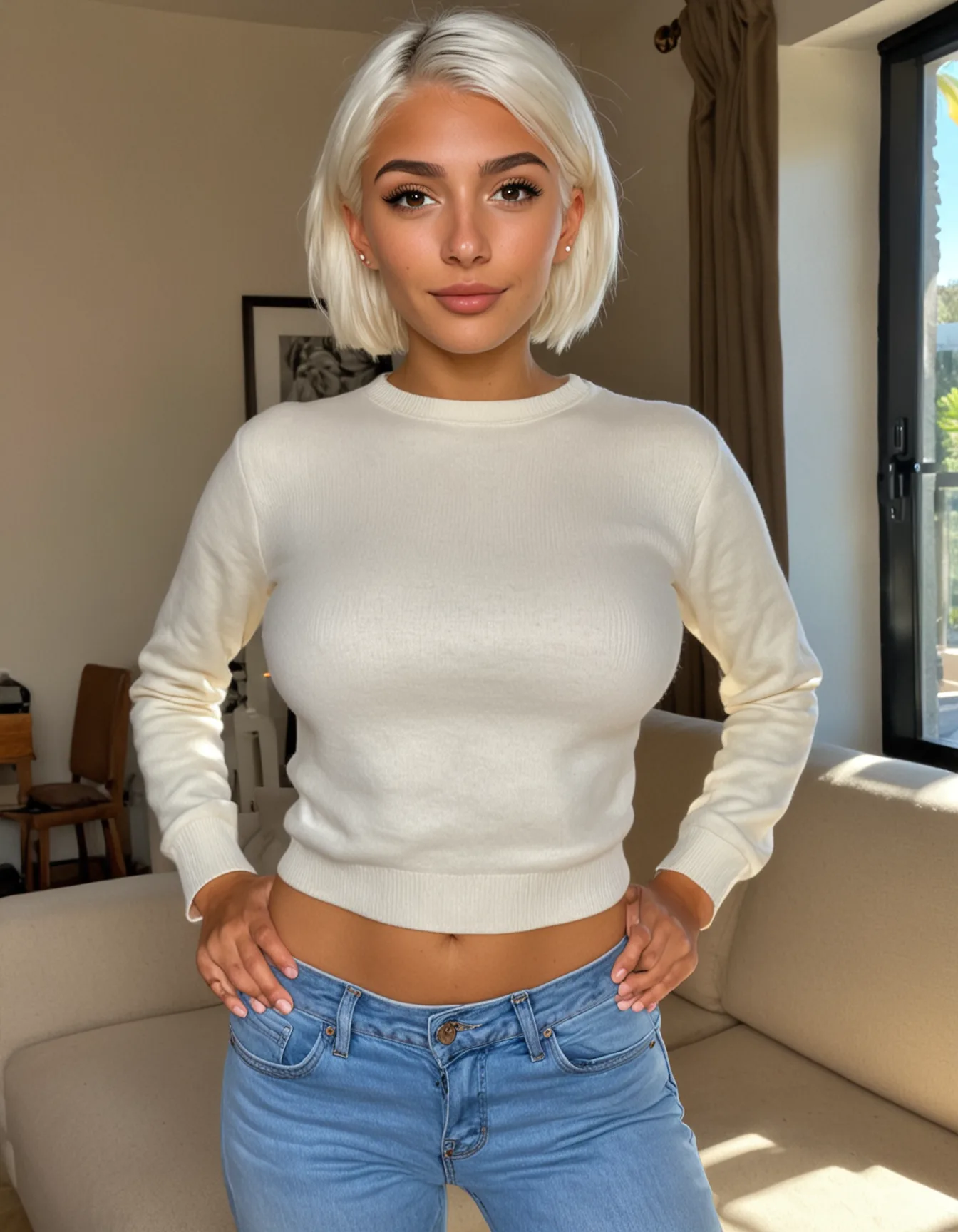
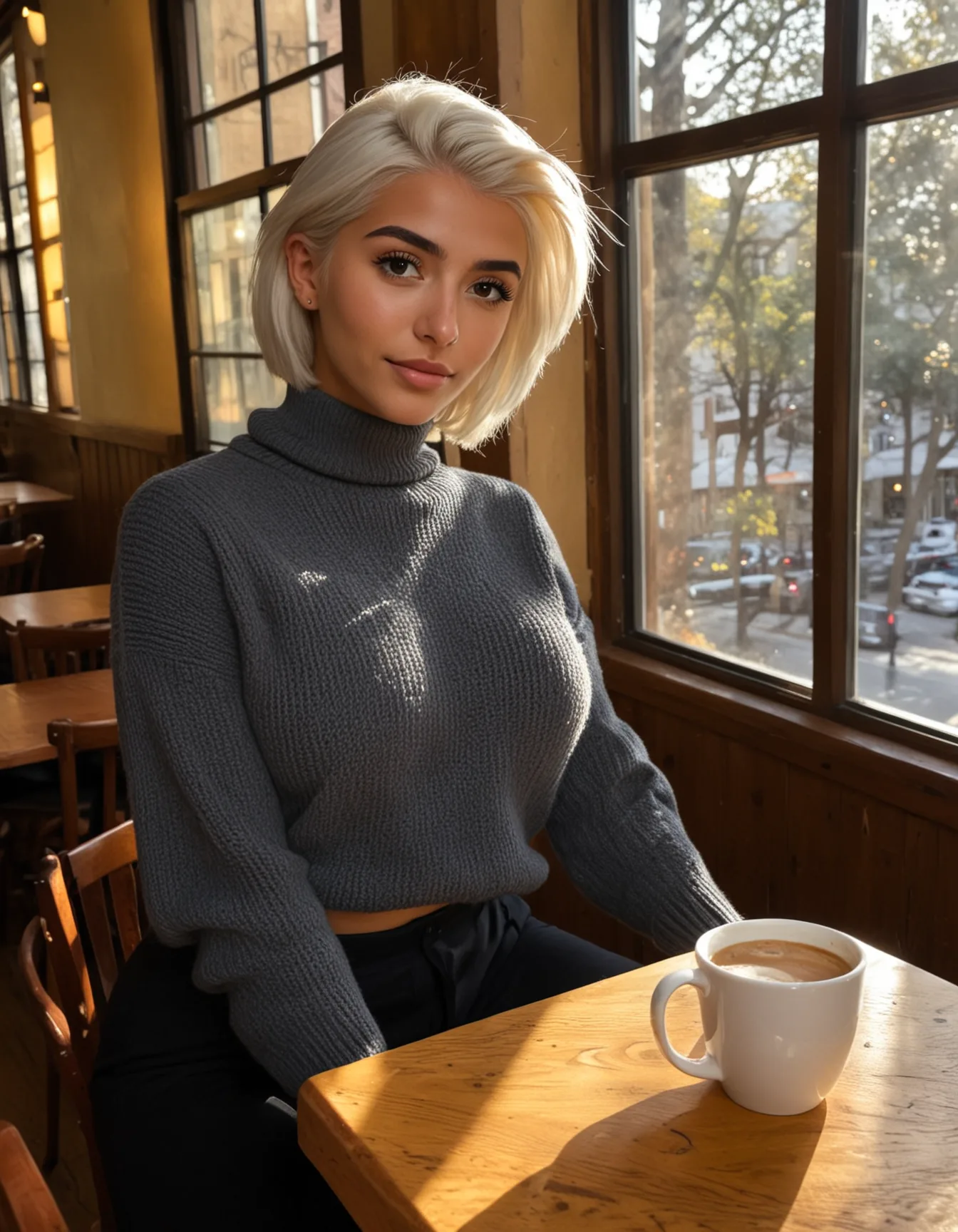
What to avoid, and why
Two phrasings look helpful and are actively counterproductive. Both are worth internalising, because they explain nearly every surprising result.
- Do not name a fastening. Write
"a grey sweatshirt", not"a zipped-up hoodie"and not"a shirt buttoned to the collar". Naming a zip or buttons puts a thing that opens into the picture, and the model will often open it. We now strip these words out of a garment clause before it reaches the model, so an older prompt of yours will behave better than it did. Writing them out is still the worse habit though, because the removal only covers wording we already know about. This is also why blazers, blouses, suits and coats are the hardest case: an open front is part of what those words mean. If your scene needs a jacket, put it over a named closed layer and expect to check the result. Worth knowing before you spend credits on it: this failure is not occasional, it is a property of the wording. We ran one tweed jacket prompt on three different seeds and all three came back the same way, so generating again will not rescue it. Change the wording, not the seed. - Do not phrase anything as a negation in
prompt."with no zip","not revealing"and"covered chest"all tend to summon exactly what they were meant to exclude, because the positive prompt has no concept of "not". Everything you want excluded belongs innegative_prompt_append, never inprompt.
Checking a result, and when retrying helps
Pass clothed_confidence: true and the response carries a clothed boolean and a 0-100 score. In practice the score comes back either at or above 90, or at or below 10, with nothing in between, so treat it as a yes or no rather than a dial.
Nothing is retried for you. If you want a second attempt, that is a loop in your own code, and it is short:
let out;
for (let i = 0; i < 3; i++) {
  out = await generate({ ...req, seed: baseSeed + i, clothed_confidence: true });
  if (out.clothed) break;
}
Retrying only helps a prompt that usually works and occasionally slips. A prompt that fails on every seed, which is what jackets and blazers do, will fail every attempt and only spend the credits. When two attempts fail the same way, treat that as a signal to change the wording rather than to raise the retry count.
NSFW poses with clothes on
If you want the composition of an adult pose but the character dressed, that is a different feature: pass clothed_pose: true. It keeps the matched pose and strips the nudity out of it. See the clothed_pose parameter.
If you need a hard guarantee
The recipe above is steering, not a switch, and this model is adult-tuned by design. If a single unexpected image would be a serious problem in your product, either validate output on your side before showing it, or use anime-pure-v1, which is reliably clothed. Character avatars are also reliably clothed: they are headshots, and /v1/characters still accepts sfw: true for that one-time avatar.
sfw parameter on /v1/images:generate has been removed. It did not reliably produce clothed images, and because it silently did nothing when passed as a string ("true" instead of true), integrations could ship against it without ever seeing an error. The parameter is still accepted so nothing breaks, but it is ignored and the response carries a warnings entry pointing here. Use the recipe on this page instead.
Scene vocabulary
The closed-enum traits cover identity in categories: gender · ethnicity · age · hair · build, plus optional eye colour and a tattoo coverage scale. Everything else lives in free text, and which free-text field depends on how long it needs to last:
appearanceon the character, for detail that belongs to the person and has to come back on every generation: a specific tattoo, a scar, freckles, a piercing. Set once, applied forever.sceneon the character, for the one-time base avatar: its lighting, mood and setting.prompton each generation, for what is happening this time: pose, outfit, location, camera.
That keeps the API surface small while letting you express anything natural language can, and it puts the things that must not drift somewhere they cannot be forgotten.
This isn't a closed list. The model understands English. Here's a starter kit of phrases that consistently work; mix and match per gen.
Eye color & facial details
piercing blue eyes·warm brown eyes·green eyes·hazel eyes·grey eyes·amber eyeslight freckles across the nose·dense freckles·cheekbone frecklessmall mole above lip·beauty mark on cheek·cleft chin·dimplessoft jawline·strong jawline·high cheekbones·full lips·natural lipsglasses·cat-eye glasses·round wire glasses·aviator sunglasses
Makeup
natural no-makeup look·subtle makeup·nude lipstickwinged eyeliner·smokey eye·red lipstick·matte burgundy lipstickglossy lips·blush, freshly applied·bronzed cheeks
Tattoos & piercings
These are worth putting in appearance rather than here: ink and piercings belong to the person, and a character generated a hundred times should not be described a hundred times.
small floral tattoo on forearm·delicate line tattoos on arms·full sleeve tattooshoulder tattoo·collarbone tattoo·back tattoo, partially visiblenose stud·septum piercing·helix piercing·multiple ear piercings
Outfit & styling
- Casual:
oversized hoodie·cropped sweatshirt·vintage band tee·jeans and white sneakers - Workwear:
tailored blazer·linen button-down·pencil skirt·satin blouse - Eveningwear:
little black dress·silk slip dress·satin gown·backless top - Lingerie:
lace bralette·silk robe·black bodysuit·matching lingerie set - Hair styling:
wet hair·hair tied in a low bun·messy bun·side part·curtain bangs·blown-out hair
Lighting
- Natural:
golden hour·blue hour·soft morning light·overcast diffuse light·harsh midday sun·backlit by window - Studio:
three-point lighting·softbox key light·rim light·butterfly lighting - Cinematic:
moody low-key lighting·neon-lit night scene·candlelight·fire-lit warm tones·chiaroscuro
Mood / atmosphere
candid·posed editorial·spontaneous laughter·contemplative·flirty glance·seductive over-the-shoulder lookwarm and inviting·melancholic·energetic·intimate·powerful·vulnerable
Composition & framing
close-up portrait·medium shot·full body shot·three-quarter view·profileshallow depth of field·bokeh background·sharp focus throughoutshot on 35mm·shot on Hasselblad·iPhone selfie(each gives a distinct look)
Location / setting
- Indoor:
sunlit kitchen·industrial loft·cozy bedroom·luxury hotel suite·art gallery·vintage diner booth - Outdoor:
foggy coastline·autumn forest path·rooftop at dusk·desert at golden hour·cobblestone street in Paris - Time of day matters: always specify (
morning·afternoon·dusk·night): the model commits to a coherent lighting setup.
For realistic-v2 and semireal-v1: write sentences
These two read natural language. Describe the scene the way you would describe a photo to a person: who is where, what they wear, where it happens, what the light is like. The pose library, outfits and settings are the same as for realistic-sharp-v1 and are matched the same way — the difference is what we do with a match: it is rendered as sentences, not tags. Three things to know:
- No weighted tokens.
(long red hair:1.4)is stripped tolong red hair; the number would otherwise end up drawn in the image. Say "very" or repeat the word instead. - Likeness comes from the avatar. Every generation carries the character's face over from the base avatar, so make that avatar a clear, frontal face (the default
scenedoes). Do not re-describe the face in your prompt. - Body settings render as set —
build,breastSize,assSizeare followed closely, including onsemireal-v1.
For anime-pure-v1: same idea, tag-style
Same vocabulary, but as comma-separated tags rather than prose. Examples:
blue eyes·heterochromia·freckles·mole under eye·fangtwintails·ponytail·messy hair·hair ornament·hair ribbonschool uniform alternative·maid outfit·kimono·casual·swimsuitlooking at viewer·looking away·upper body·cowboy shot·from belowsunset·night sky·cherry blossoms·indoor·outdoors
For video-v1 (video): describe motion
slow head turn·gentle smile spreading·hair flowing in breeze·eyes blinking·looking up to camerasips coffee·brushes hair behind ear·laughs softly·turns to look over shoulder
Heuristic. Two to four short comma-separated clauses beats one long sentence. The model treats prompts like a sequence of weighted features; long sentences dilute each feature's weight.
Prompt tips
Write prompts in English
English gives the most reliable results. That means prompt on images and videos, and scene on characters.
On /v1/images:generate, a prompt in a non-Latin script (Persian, Russian, Japanese, Chinese, Korean, Arabic) is translated to English first, and everything else, including pose matching, follows that translation. The response carries the English we used as translated_prompt and a warnings entry with code non_latin_prompt, so you can check it. If the translation step is unavailable the prompt goes through as sent, which renders the character without your scene, and the warning says so.
Since 2026-10-22 a prompt in a Latin-script language other than English (Spanish, Portuguese, French, German, Italian, Dutch, Polish and others) is translated the same way, on the API and in the playground, and the response says so with a translated_prompt warning. Before that it reached the model as sent: in our audit those prompts scored lower, and one asking for a nude pose came back dressed. raw_prompt: true is never translated. Still not translated: video prompts and the character scene. Write those in English, or translate in your stack before calling us.
- ✅
on all fours on a bed, ass up, seen from behind, looking back over her shoulder at the camera, bedroom - ⚠️
یک دختر برهنه که چهار دست و پا استworks on images through translation; checktranslated_promptif the result is off
For realistic-sharp-v1
Natural-language description works best. Lead with the scene, follow with lighting and style. Skip identity words (gender, age, hair); the character already encodes those.
- ✅
sitting at a wooden cafe table at golden hour, casual cardigan, candid photographic portrait - ✅
walking on a foggy boardwalk, leather jacket, cinematic lighting, shallow depth of field - ❌
a hispanic woman in her twenties with brown hair sitting in a cafe: identity duplicated; the character already encodes this. Style suffers.
For realistic-v2 and semireal-v1
Plain prose, one scene: what the character is doing, what they are wearing and where. We add the character, the lighting and the look of the model ourselves, so there is no need for quality or style words. Four things behave differently from realistic-sharp-v1, all measured on these two models:
- Framing words in the prompt are ignored. Five headshot requests written into the text all came back as body shots. Send
"framing": "close_up"instead, which gave a head-and-shoulders portrait three times out of three (see Framing). - Name the top and the bottom. An outer layer on its own, such as
a wool coat over a scarf, came out with nothing under it. - For a nude image, a library pose is the dependable route. In free text,
lying naked on a bedcame out fully nude in 2 of 6 seeds onrealistic-v2and 4 of 6 onsemireal-v1; the rest were in underwear. A neutral posture without any nudity words renders dressed on every model. - A bath, a shower or a hot spring is not a nudity word.
in an outdoor hot spring, water to the chestcame back in a T-shirt, the same scene starting withnude,came back nude. A default outfit is added whenever the prompt names no clothes and asks for no nudity. Writenudeortoplessinto the scene. Comma-separated tag lines work as well as sentences here: on three scenes, with the nudity word in both, sentences came back nude 16 of 16 and tag lines 17 of 17 (2026-10-16). - A reference carries the face, not the outfit. The clothes in the reference image do not carry over to new images. To keep a character in their outfit, write it into the prompt (
wearing a black leather jacket and jeans): in a customer's test the outfit matched in 3 of 3 renders (2026-10-19). - Face-worn items: say what and where, skip the colour. A mask, eyepatch or veil in the reference is stored as
domino mask over eyes(where it sits, no colour). In your prompt, write it the same way: a baremaskcan land on the cheek, and a colour that matches the reference's outfit (blackon a character drawn in black latex) can pull that outfit back in on a nude render, 3 of 5 in a customer's test (2026-10-19). semireal-v1draws faces younger than the photoreal models. A petite character with short hair is the combination most likely to be withheld by the output age check, and adding an adult age to the prompt did not help in our tests. Change the character instead: try a fuller build or longer hair, or run it onrealistic-v2. Withheld images are not charged.
- ✅
kneeling on a rug by the fireplace, black lace bra and matching panties, looking at the camera, cosy living room - ✅
walking along a harbour at sunset, white linen shirt and blue jeanswith"framing": "full_body" - ❌
close-up headshot, face only, sitting in a cafe: the framing words are ignored here; send"framing": "close_up"and keepsitting in a cafe.
Both models take longer than realistic-sharp-v1: about 22 seconds on realistic-v2 and 10 to 13 on semireal-v1, so a character with an avatar usually answers 202 and you poll. Pick realistic-sharp-v1 when speed matters most, and realistic-v2 when sharpness and realism matter most.
Framing, and why prompt length decides it
Framing words work, but only while the prompt stays short. Put them at the very front and keep the rest to a line or two.
Measured over 46 generations on one scene: with full length shot, entire body from head to toe, feet and shoes visible, wide shot in front of a short prompt, 36 of 36 came back head to toe with the shoes in frame, across two characters and ten seeds. Put a 150-word identity paragraph behind those same words, on the same seeds, and it drops to 2 of 10. The instruction is present either way; in a long prompt everything else outweighs it.
- ✅
full length shot, entire body from head to toe, feet visible, wide shot, walking down a city street at sunset, fitted black dress, golden hour - ❌ the same thing as a paragraph, with the character's face, hair, age and build described again: the framing is still in there, it just loses.
The model draws words, it does not follow instructions
Anything phrased as a direction is read as something to render. vary the setting, randomly choose a pose and avoid repetitive framing do not vary or avoid anything; listing a bedroom, a bathroom and a pool in one prompt asks for all three at once.
- Pick the location and the pose in your code, send one of each, and change
seedper request. That is what gives you variety across a set. - Everything you want to avoid goes in
negative_prompt_append, never inprompt. Words likeplastic,CGIandAI-generatedin the prompt pull the image toward exactly those.
Outfits with explicit poses
Pose aliases (blowjob, cowgirl, etc.) expand to a curated template. Those templates default to nude, but naming an outfit switches the pose to its clothed form, so the act and the outfit no longer contradict each other. This works for oral poses too.
- Name the outfit as an outfit (
"in orange lingerie","wearing a schoolgirl uniform") and it is applied to the pose. In hetero poses the partner stays undressed so the act remains visible. - Displaced clothing gives you the most control over how much stays covered:
"orange lingerie pulled aside","bra pushed down","panties around one ankle". - Say nothing about clothing and a sexual pose runs nude, as before. Neutral postures (
standing,sitting,kneeling,crouching, a portrait) run dressed unless you ask for nudity, since 2026-09-15. clothed_pose: truekeeps the composition and the act while keeping the character dressed, including on oral poses.- Check
matched_posein the response to confirm the pose you intended was detected.
For anime-v2 and anime-pure-v1
Tag style: comma-separated, no full sentences. Quality tags + subject + scene + style.
- ✅
masterpiece, best quality, sitting on rooftop, sunset, school uniform alternative, looking at viewer - ❌
she is sitting on a rooftop watching the sunset: full sentences underperform tag-style prompts here. - ❌
upper-body portrait, no legs or feet, no full body: a negation adds the thing it names. In our audit this prompt came back as legs only. Put exclusions innegative_prompt_append(legs, feet, full body) and keeppromptto what should be there (upper body, portrait). - Long paragraphs with
raw_prompt: trueare read in chunks of about 75 tokens, and what comes later weighs less: a framing or a second person named in the fourth sentence is often missed. Keep it to tags, most important first. The response carries ananime_raw_prompt_stylewarning when a raw anime prompt is long or full of negations.
For video-v1 (video)
Describe the motion, not the scene; the avatar already sets the scene. Short clauses, mostly verbs.
- ✅
slow head turn, gentle smile, hair gently flowing in breeze - ✅
she sips coffee, looks up at camera, slight grin - ❌
a beautiful woman in a coffee shop in the morning: that's a scene description, you'll get minimal motion.
Idempotency
Send Idempotency-Key: <your-key> on any POST. Up to 100 chars, scoped per customer. A repeat with the same key returns the prior response: no duplicate charge, no duplicate gen.
Tip: use a UUID from your end so retries after a network drop are safe.
Webhook verification
Every webhook is signed with HMAC-SHA256 using your account's webhook secret (find it on the Profile page). The signature is sent in X-Xavira-Signature:
X-Xavira-Signature: t=1779350400,v1=a3f4d5e6...e9b
t is a Unix timestamp (epoch seconds). v1 is the HMAC-SHA256 hex of "<t>.<raw-body-bytes>".
Verification: Node.js
import crypto from 'node:crypto';

function verifyXaviraSignature(rawBody, signatureHeader, secret) {
  const parts = Object.fromEntries(
    signatureHeader.split(',').map(p => p.split('=')),
  );
  const t = parts.t, v1 = parts.v1;
  if (!t || !v1) throw new Error('malformed signature header');

  // Reject anything older than 5 minutes to prevent replay.
  const age = Math.floor(Date.now() / 1000) - Number(t);
  if (Math.abs(age) > 300) throw new Error('signature timestamp too old');

  const expected = crypto
    .createHmac('sha256', secret)
    .update(`${t}.${rawBody}`)
    .digest('hex');

  // Constant-time compare.
  if (!crypto.timingSafeEqual(Buffer.from(expected), Buffer.from(v1))) {
    throw new Error('signature mismatch');
  }
}

// Express example — note: use raw body, NOT JSON.parse output.
app.post('/xavira-webhook', express.raw({ type: 'application/json' }), (req, res) => {
  try {
    verifyXaviraSignature(req.body.toString('utf8'), req.get('x-xavira-signature'), process.env.XAVIRA_WEBHOOK_SECRET);
  } catch (e) {
    return res.status(401).send(e.message);
  }
  const payload = JSON.parse(req.body.toString('utf8'));
  // ... handle payload ...
  res.status(200).send('ok');
});
Verification: Python
import hmac, hashlib, time

def verify_xavira_signature(raw_body: bytes, signature_header: str, secret: str) -> None:
    parts = dict(p.split('=', 1) for p in signature_header.split(','))
    t, v1 = parts.get('t'), parts.get('v1')
    if not t or not v1:
        raise ValueError('malformed signature header')

    if abs(int(time.time()) - int(t)) > 300:
        raise ValueError('signature timestamp too old')

    expected = hmac.new(
        secret.encode('utf-8'),
        f"{t}.{raw_body.decode('utf-8')}".encode('utf-8'),
        hashlib.sha256,
    ).hexdigest()

    if not hmac.compare_digest(expected, v1):
        raise ValueError('signature mismatch')
Common pitfalls
- Sign the RAW request body, not
JSON.parseoutput. Re-stringifying produces different key order → signature mismatch. - Use constant-time comparison (
timingSafeEqual/hmac.compare_digest). Equality with==leaks the secret via timing side-channel. - Reject old timestamps (5-min window). Without that, an attacker who once captured a webhook can replay it forever.
- Rotate on suspected leak via the Profile page: old signatures stop verifying immediately.
Moderation
Three-tier moderation runs on every gen. Adult content is allowed by design: the API is built for it. We block exclusively for:
- Minors: any age cue under 18, child-coded features, school settings, loli/shota.
- Non-consent: drugged/unconscious, forced acts, "against will" framing.
- Bestiality, incest involving identifiable family relations, extreme sexual violence/gore.
Three tiers
- Tier 1, rule-based: ~150 lexical patterns. Runs in <1ms, fail-fast on obvious matches.
- Tier 2, text classifier: a fast third-party text classifier. Catches paraphrasing the rules miss.
- Tier 3, output vision classifier: a third-party vision classifier checks the generated image, on realistic and anime. On anime a dedicated apparent-age check runs alongside it, because a general classifier does not see age on stylised art. An image in a sexual context (your prompt asks for nudity, sex, lingerie, swimwear or similar, or the image shows exposed breasts) that reads as possibly under 18 is withheld (
422 output_blocked, categoryapparent minor). A clothed, everyday image is delivered either way, and characters drawn with clearly adult features and proportions are not affected. If the age check cannot run on an image in a sexual context, it is withheld too (503 moderation_unavailable, safe to retry) rather than delivered unchecked. In every case the image is deleted and no credit is charged.
Block response (422)
{
  "error": {
    "code":    "moderation_blocked",
    "message": "Blocked: prompt contains restricted content (category=minors)",
    "details": { "tier": "rule", "category": "minors" }
  }
}
When tier=ai or tier=output the category is free-form. Surface the message to your end-user verbatim.
Reference images
Bring your own characters. You supply a synthetic image, we screen and review it, and an approved image becomes a character you generate from like any other: same character_id, same images:generate and videos:generate calls. The full endpoint reference, request and response shapes, and the per-model notes live on the reference images API page; this section is the part every integrator needs to know first: who can use it, what we accept, and what happens to an image after you send it.
Photo references follow the photo. For a character built from a photograph on realistic-v2, hair colour, hair length and build come from the photo itself, not from the traits we guessed at intake, so editing those traits afterwards does not change its renders. To change them, supply a different reference image.
Supply a close-up of the face. The likeness can only be as close as the face in your image allows. A full-body photo shows the face only a few hundred pixels tall, and a character built from it matches the real face noticeably less than one built from a close-up of the same person. We tested this on one woman, with the same prompts and seeds, and the character from her close-up came out clearly closer to her real face. Use a sharp, frontal, evenly lit close-up (the face 300 pixels tall or more) as the reference, and use the full-body photo only for a different character. When the face in your image is small, the review tells you so. Hair volume and curl are not carried over reliably, so expect straighter hair than a wavy reference shows.
What it looks like
Each pair is a supplied synthetic image and a later generation of the character it became, from one plain sentence ("sitting by a big window in a cosy cafe, holding a cup of coffee"). New scene and outfit; the character stays.
realistic-v2: the face is taken from your image.
semireal-v1: the face is taken from your image, in the painted style.
anime-v2: we read the look off the drawing ("red hair, wavy hair, swept bangs, green eyes, drop earrings"); build and age were set with one PATCH after approval.

Who can use it
- Buy a credit pack. Any pack. Reference images open on the account the moment the purchase is confirmed; an account that paid before this rule turns it on with one click on the reference images page. Without a pack the feature is not available, and
/v1/reference-imagesanswers403 reference_images_not_enabled. - Sign the supply agreement, once. The Reference Image Supply Agreement is signed in the portal by a named signatory for your company, and countersigned by us. It covers every image you supply afterwards, from the portal or from your backend, so nothing is signed per upload. Until we have countersigned, the endpoint answers
409 agreement_not_countersigned. - Supply. Through the portal form, or
POST /v1/reference-imageswith your normal API key: up to 10 images per call, JPEG, PNG or WebP, with the provenance fields below. A request body is limited to about 6 MB (base64 adds a third), so keep a call to roughly 4 MB of images in total.
What we accept, and what we never accept
Every image you supply carries the warranties of the agreement, given afresh on each supply:
- Wholly synthetic. Generated by an AI system. Not a photograph, recording, edit, composite or derivative of a photograph of anyone.
- No real person. The image does not depict, resemble, or intend to resemble any identifiable living or deceased person, public figure or private individual. This is absolute: consent does not make a real person's likeness acceptable here.
- No minors. Nobody who is, appears to be, or is presented as under 18. Being synthetic or "drawn" does not qualify this in any way.
- You hold the rights to the image and to the output derived from it, and you can evidence how it was made.
Provenance is recorded per supply and is required on every call: origin (ai-own for your own model, ai-thirdparty for someone else's; photographic or uncertain origin is refused), generator_model (the system that produced it), and generated_on if you have it. We may ask you, within five business days, to substantiate a provenance record with generation logs or account records from the originating service. Keep them.
Screening: what happens to an image after you send it
Every image, from the form or the API, runs the same automated intake checks before a person sees it. These fail closed: if a check cannot run, the image is held, not admitted.
- Camera metadata. Capture-device Exif contradicts "generated by an AI system" and is recorded as a flag. A stripped file is the normal case and is not held against you.
- Apparent age. A classifier estimates whether the depicted person could be under 18. An image that reads as a minor is refused outright (
422 image_rejected), is never stored, and no setting or reviewer changes that. An inconclusive result is held for a person to decide, with one exception since 2026-09-22: on a drawn or painted image (not a photograph), an inconclusive first read gets a second automated read that looks past the art style. Only when that read is clearly adult does the image continue as a pass, and the second read is recorded on the image; anything else is held for a person. - Public figure. A resemblance to a known real person is flagged for review.
- Dimensions and face. Under 320 px on the short edge is refused. On the face models (
realistic-sharp-v1,realistic-v2,semireal-v1) one clear, findable face is required; a face under 112 px tall is accepted with a warning that likeness will be weaker on every generation. Onanime-pure-v1we read the character's traits off the image instead of copying the face. - Duplicates. Matched on file content. A re-sent file returns the character it already has; a file you withdrew or we declined cannot be supplied again.
Supplying images that pass
Age is judged from the picture, at supply and again on every generated image; a stated age does not count. In anime and illustrated styles it is harder to read, so:
- Show an adult body, waist-up or three-quarter, not only a face. A character built from a head alone tends to be drawn slight in later scenes, the most common reason a generated image is withheld.
- Adult face and styling. A defined jaw, eyes in adult proportion; no school uniforms, toys or childlike poses.
- One character, face visible, no mask or goggles, at least 1024px on the short edge, in neutral light (coloured light changes the hair and eye colours we read).
- Match the model to the style: flat anime
anime-v2, webtoon or paintedsemireal-v1, photographicrealistic-v2orrealistic-sharp-v1. - Check the character after approval and correct build, hair or eye colour with
PATCH /v1/characters/{id}.
More detail, with the reasons: fewer rejections, fewer withheld images.
Review and outcomes
Each image ends in one of three states, returned in the supply response and listed in your library:
approved: a character exists and you can generate from it now. Anotemay still carry a quality warning worth acting on.rejected: the gate refused;notesays why. No character is made.pending: a person will decide. This is where inconclusive age results go (on drawn images: those the second read did not settle as clearly adult) and public-figure flags; a named reviewer decides those.
Review is automatic on accounts we have enabled it for, and manual on the rest: the decision rule is identical, only who applies it differs. We may accept, reject, or later withdraw any image at our discretion, and we may review a supply again if something comes to light after approval.
Generating from a reference character
- Output moderation still applies. The same output checks as for every other character run on each generation. On
anime-pure-v1andanime-v2a generated image in a sexual context that reads as possibly under 18 is withheld (422 output_blocked) and not charged; the age a character reads as comes mostly from the reference you supplied. - Video needs a generated frame.
videos:generateis seeded from an image we generated, never from your uploaded file: generate an image first and pass itsgeneration_id. - Prohibited use is the same as everywhere. No sexual content involving anyone who is or appears to be a minor, no intimate imagery of an identifiable real person, no content passing a real person off as authentic.
Withdrawal, retention and deletion
You can withdraw any supplied image at any time from your library or with DELETE /v1/portal/reference-images?id=…. We delete the image and, at your election, the character derived from it; generations you already made from it stay yours. We may keep a cryptographic hash of a withdrawn or refused file so that it cannot be supplied again. If we form the view that a warranty was breached, or on termination, we may delete any reference image, its character and its output without notice.
Errors worth handling
note says why. Usually no findable face or too small.Errors
Every error follows the same shape: { "error": { "code": "...", "message": "...", "details"?: {...} } }. Match on error.code, not on the message.
Every response carries a request id, successes included: the X-Request-Id header, and a request_id field in the body (on errors it is repeated inside error, so pasting the error object is enough). Log it. If you send it to us we can pull up that exact call, which is the difference between us reading your request and us guessing from a timestamp.
{
  "error": {
    "code":       "moderation_blocked",
    "message":    "school setting",
    "details":    { "tier": "ai", "category": "ai_flagged" },
    "request_id": "01M113S6FJ2BDRX5N0PBFG1V5E"
  },
  "request_id": "01M113S6FJ2BDRX5N0PBFG1V5E"
}
invalid_character_id, invalid_prompt, invalid_traits.character_id, OR it belongs to another customer. We don't leak which.wait: false and its avatar is still rendering. Poll its generation, then retry.Retry-After header (always < 60 sec). See Rate limits.Rate limits
Per-API-key, fixed 1-minute windows. Each key has independent counters; using a separate key per environment is the recommended pattern. The caps below are the Starter / Builder baseline; Scale doubles them (2×) and Volume quadruples them (4×). Enterprise caps are negotiable.
Requests in flight at the same time: there is no cap per key beyond the per-minute count above. They queue on our GPUs, so a burst renders one after another per box and the later ones wait; a burst of 8 images on one character completed without a failure in our test (2026-10-07). Poll the 202s with GET /v1/generations/:id rather than holding connections open.
Response headers
Every gen response carries rate-limit headers so you can back off gracefully:
X-RateLimit-Limit:     60         # cap for this endpoint
X-RateLimit-Remaining: 47         # calls left in the current window
X-RateLimit-Reset:     1779350400 # epoch seconds when window resets
When you hit the limit
HTTP 429 rate_limited. Honour the Retry-After header (always < 60 seconds, that's the window size).
HTTP/1.1 429 Too Many Requests
Retry-After: 23
X-RateLimit-Limit: 60
X-RateLimit-Remaining: 0
X-RateLimit-Reset: 1779350423

{
  "error": {
    "code": "rate_limited",
    "message": "Rate limit exceeded — 60/min for /v1/images:generate. Retry in 23s."
  }
}
Need more? Email hello@xavira.ai. We'd rather lift your cap than have you build retry queues. Enterprise plan offers per-key custom caps.
Spec & SDKs
Machine-readable spec + a Postman collection so you can poke at the API without writing code.
OpenAPI 3.1 spec
Full schema for every endpoint, request body, response shape, and error code. Import into Postman, Insomnia, openapi-generator, or any code-gen tool of your choice.
Download openapi.yaml View raw
Postman collection
Pre-wired collection with bearer auth, variable extraction (response character_id auto-saves to a collection variable, then the image-gen request references it), and idempotency-key auto-generation via {{$guid}}.
Set the apiKey collection variable before running. The collection runs Status → Create character → Generate image in that order; later requests pick up {{characterId}} automatically.
JavaScript / TypeScript SDK
Official Node.js SDK with typed request + response shapes, HMAC webhook verification, rate-limit-aware errors, and a pollUntilComplete helper for async video gens.
npm install @xavira/sdk
import { Xavira } from "@xavira/sdk";

const xavira = new Xavira({ apiKey: process.env.XAVIRA_API_KEY! });

const character = await xavira.characters.create({
  model_id: "realistic-sharp-v1",
  traits: { gender: "female", ethnicity: "east-asian", ageRange: "23-29",
            hairLength: "long", hairColor: "black", build: "slim",
            breastSize: "medium" },
});

const image = await xavira.images.generate({
  character_id: character.character_id,
  prompt: "sitting in a sunlit kitchen, casual sweater, candid portrait",
});
console.log(image.output_url);
Source + full README on GitHub.
PHP
No SDK and no Composer package needed: the whole API is JSON over HTTPS, so one curl helper covers every endpoint. This creates a character, waits for its avatar, then generates an image.
<?php
$apiKey = getenv('XAVIRA_API_KEY');

function xavira(string $method, string $path, ?array $body = null, array $headers = []): array
{
    global $apiKey;

    $ch = curl_init('https://api.xavira.ai' . $path);
    curl_setopt_array($ch, [
        CURLOPT_CUSTOMREQUEST  => $method,
        CURLOPT_RETURNTRANSFER => true,
        CURLOPT_CONNECTTIMEOUT => 15,
        CURLOPT_TIMEOUT        => 60,
        CURLOPT_HTTPHEADER     => array_merge([
            'Authorization: Bearer ' . $apiKey,
            'Content-Type: application/json',
        ], $headers),
    ]);
    if ($body !== null) {
        curl_setopt($ch, CURLOPT_POSTFIELDS, json_encode($body, JSON_UNESCAPED_SLASHES));
    }

    $raw    = curl_exec($ch);
    $status = curl_getinfo($ch, CURLINFO_RESPONSE_CODE);

    // Status 0 means there was no HTTP response at all: DNS, TLS or a firewall.
    // curl_error() is the only thing that says which, so never swallow it.
    if ($raw === false || $status === 0) {
        throw new RuntimeException('cURL failed (errno ' . curl_errno($ch) . '): ' . curl_error($ch));
    }

    $json = json_decode($raw, true);
    if (!is_array($json)) {
        throw new RuntimeException("HTTP {$status}, non-JSON response: {$raw}");
    }
    if ($status >= 400) {
        throw new RuntimeException("HTTP {$status} " . ($json['error']['code'] ?? 'unknown')
            . ': ' . ($json['error']['message'] ?? $raw));
    }

    return $json;
}

function xaviraWait(array $gen): array
{
    while ($gen['status'] === 'pending') {
        sleep(2);
        $gen = xavira('GET', '/v1/generations/' . $gen['generation_id']);
    }
    if ($gen['status'] !== 'completed') {
        throw new RuntimeException($gen['status'] . ': ' . ($gen['error_message'] ?? ''));
    }
    return $gen;
}

// 1. Create the character. wait:false returns straight away, so no proxy in
//    front of your app can cut the connection while the avatar renders.
$character = xavira('POST', '/v1/characters', [
    'model_id' => 'realistic-sharp-v1',
    'wait'     => false,
    'name'     => 'Sora',
    'traits'   => [
        'gender'     => 'female',
        'ethnicity'  => 'east-asian',
        'ageRange'   => '23-29',
        'hairLength' => 'long',
        'hairColor'  => 'black',
        'build'      => 'slim',
        'breastSize' => 'medium',
    ],
], ['Idempotency-Key: ' . bin2hex(random_bytes(16))]);

// 2. Wait for the avatar. Generations answer 409 character_pending until it lands.
xaviraWait(['status' => 'pending', 'generation_id' => $character['generation_id']]);

// 3. Generate. Most calls come back completed (201); a slow one returns 202
//    with status "pending", and the same wait loop finishes it.
$image = xaviraWait(xavira('POST', '/v1/images:generate', [
    'character_id' => $character['character_id'],
    'prompt'       => 'sitting in a sunlit kitchen, casual sweater, candid',
]));

echo $image['output_url'] . "\n";
Run it with XAVIRA_API_KEY=xav_live_... php example.php. Keep the key in the environment rather than in the file, so it cannot end up in your repository.
Getting statusCode: 0?
If curl_exec() returns false and CURLINFO_RESPONSE_CODE is 0, the request never reached us and there is nothing in our logs to look up: it failed inside your PHP process. curl_errno() and curl_error() say why, and they are the first thing to print.
- errno 60,
unable to get local issuer certificate: your PHP install has no CA bundle. This is the usual one on Windows and XAMPP. Download cacert.pem, then point bothcurl.cainfoandopenssl.cafileat it inphp.iniand restart Apache or PHP-FPM. Do not reach forCURLOPT_SSL_VERIFYPEER => falseinstead: that turns off certificate checking on the traffic carrying your API key. - errno 6 or 7: DNS, or an outbound firewall blocking
api.xavira.ai. - errno 28: your timeout is shorter than the generation. Allow at least 60 seconds, or pass
wait: falseand poll.
Python SDK
On the roadmap. In the meantime, openapi-generator + openapi.yaml produces a working httpx-based client.